
Orc Arch
Delegating Execution to Tools and Subagents

Building with AI agents in production, you hit the same wall every time: context rot. You give OpenAI/Claude/Gemini detailed specs, it starts implementing, and halfway through it barely resembles what you asked for. Your carefully-crafted system prompt? Buried under 8,000 tokens of other context.

Standard fixes: better prompts, caching, longer context windows, re-prompting mid-stream.
Better fix: Stop pretending one agent can hold everything.
Anthropic keeps claiming the way to build Agents is changing next year. The pattern that will likely work is keeping the Orchestrator as token efficient as possible. It isn’t about making individual agents smarter, it is about making them smaller.
The pattern
Orc-Arch (aka Orchestrator-Worker, Conductor, Manager-Worker, Supervisor Pattern)
Main agent = pure coordinator. Plans approach, orchestrates execution. Protect the tokens!
Subagents = specialized executors. Separate context windows. Do one thing well.
Tools = Orc tools/Exec tools. There’s a difference. You can just do things.
Workflows = set playbooks. What most of us have been building up til now.
Synthesis agent = conflict resolver. Unifies outputs when workers diverge.
Main goal. Protect the context window of the Orchestrator with well crafted “tools” that provide only the needed context.
Orcs treat everything as tool calls. Subagents are tools. Workflows, tools. Tools are tools. And slightly uncomfortable truth, but humans are tools. (Ender called this “a lie” when Graff told him in Ender’s Game, but the system proceeded anyway, as do we.)
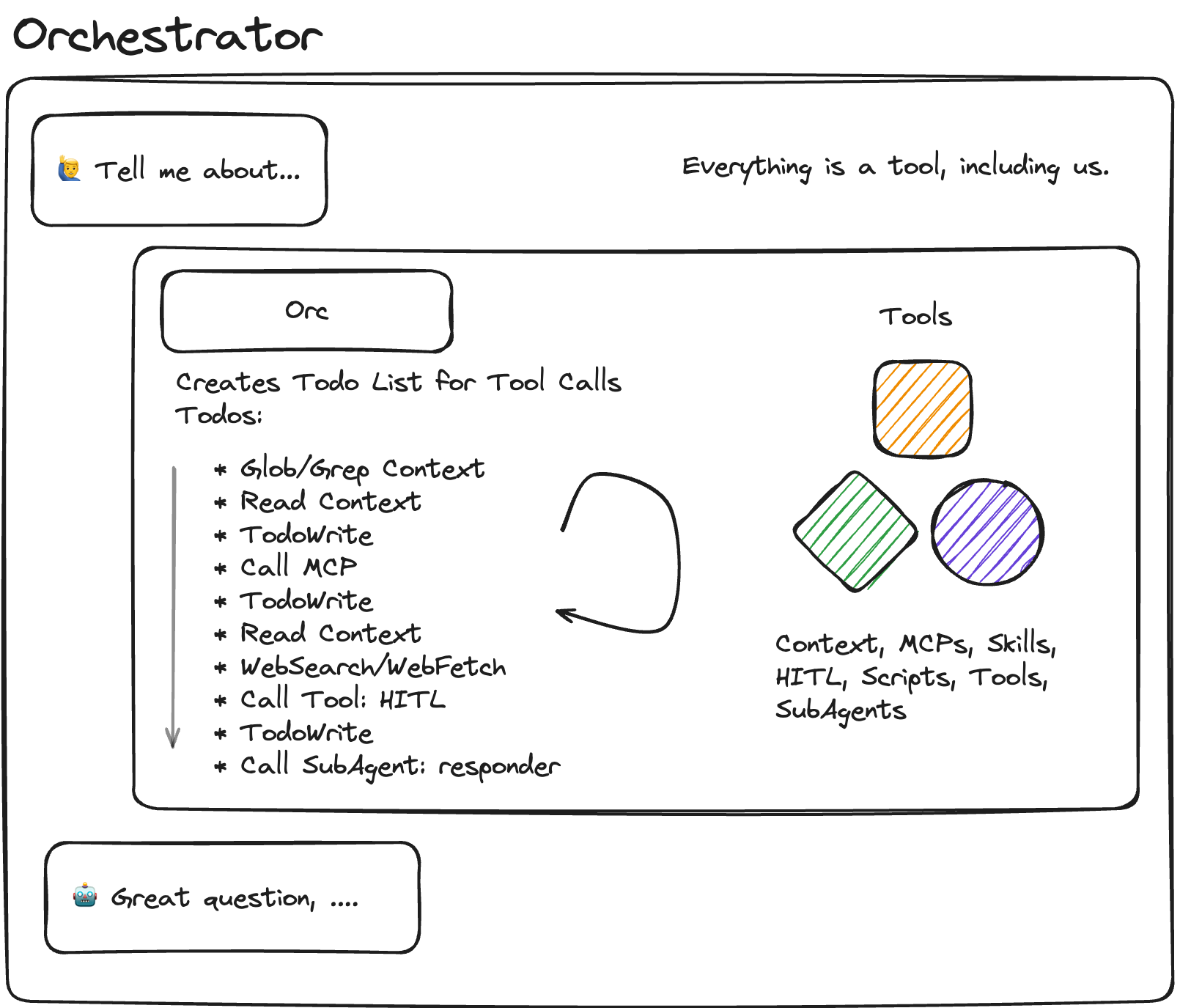
This isn’t new. Microsoft documented it in their Azure AI patterns. It’s scattered across Substack posts, company blogs, SDK documentation and subreddits.
It was too early. The orchestrators weren’t good enough at agentic work. You needed a model that could actually plan, decompose tasks, and maintain coherence across tool calls without drifting. Most attempts fell apart in production.
Anthropic’s Agent SDK makes it almost trivial to actually ship now. Expect more entrants.
Why it works now
Basically we didn’t have Orchestrators worth a damn. You need to be a nerd like me to follow this closely enough but focusing on the Agentic pieces is what’s important here. Huge caveat on trusting benchmarks, but what we care about how agentic the Orc is.
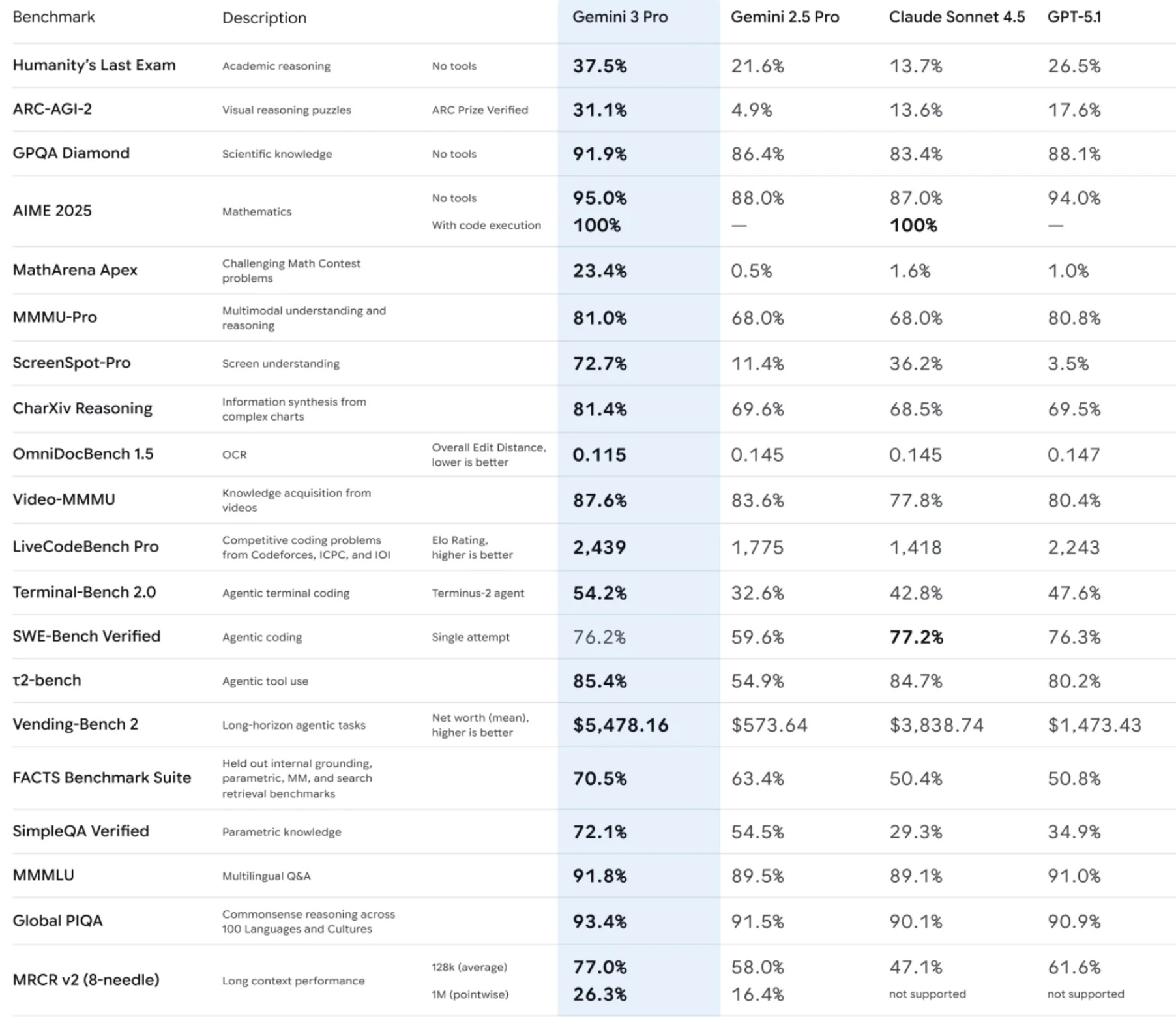
Pay attention to ARC-AGI-2, Terminal-Bench 2.0, SWE-Bench Verified, 𝞃2-bench, and Vending-Bench 2. The industry is hill climbing on agentic metrics. Anecdotally, I’m seeing more Claude Code adoption than Codex despite lower inference.
For engineering, agentic capability > raw speed.
But the point is models are finally capable of orchestration. We are putting the pattern to the test for production.
Using Claude Agent SDK in Production: Phase 1
The Theory
Claude Code is trained and architected specifically for file operations - Read, Write, Edit, Glob, Grep. That’s the theory.
We have +100 MD files of support docs, product specs, and procedures that need to get periodically updated. Ultimately they are pretty stable, so the question is whether performance by Agent SDK on these over RAG provides some alpha.
Throughout the article, I use Claude Code and Agent SDK interchangeably. The SDK powers Claude Code.
Phase 1: Test whether this holds up in a deployed runtime environment.
Standard Claude models work great with chat interfaces. But with file operations? That’s different. You need:
File system awareness
Path handling
Content parsing
Context manage
Claude Code/Agent SDK is supposedly optimized for this. Plus it had native support for other p1 issues for us. We wanted to use MCP servers, custom tools and subagents as well so the Agent SDK was a natural fit.
The Setup
Built a runtime using the Agent SDK’s query function. Not full orchestration, just Claude Code with file tools, deployed to handle real customer support requests.
TypeScript SDK was the obvious choice for us. Team already fluent, existing Node codebase, easy integration.
Proof of Concept Goals
Validate file operation capabilities: Can Claude Code effectively use Read, Write, Grep, Glob tools in real-world scenarios?
Test MCP server integration: Can we reliably connect custom MCP servers for our specific tools?
Create one custom tool: Build a simple custom tool to validate custom functionality.
Their docs mentioned a variety of hosting options so I wasn’t worried about that part. Focus was on Claude Code’s file ops and MCP integration.
Architecture Decisions
The need for MCP
Agent SDK provides file tools out of the box. But we needed custom tools for our specific use case: customer data access, ticket management, knowledge base queries. Luckily, our customer already built these tools with MCP so we just had to connect them.
Built an MCP proxy for these. Runtime MCP initialization proved more reliable than .mcp.json config files.
// Runtime MCP - load custom tools dynamically
// Combine internal MCP server with external configs
// Claude Agent SDK will connect to external MCPs automatically
const allMcpServers = {
	‘runtime-tools’: {
		type: ‘sdk’ as const,
		name: ‘runtime-tools’,
		instance: mcpServer.instance
	},
	...Object.entries(externalMcps).reduce(
		(acc, [name, config]) => {
			acc[name] = config;
			return acc;
		},
		{} as Record<string, unknown>
	)
};

const result = query({
	prompt: userQuery,
	options: {
		systemPrompt: SYSTEM_PROMPT,
		model: ‘claude-haiku-4-5’,
		mcpServers: allMcpServers
	}
});
Agent SDK auto-discovers these and connects via stdio transport.
Tool restrictions
Disabled WebSearch and WebFetch. Customer support doesn’t need live web access. I saw an inclination for Claude to use these over the MCP tool for answering some questions. Prevents hallucination from unvetted sources in our use case.
disallowedTools: [’WebSearch’, ‘WebFetch’];In the spirit of the 12-Factors of Agent Development: Launch with simple APIs, we connected this all with a REST endpoint.
What we’re tracking
Tool usage
We’re tracking every tool call: name, input, output, errors. If most of the interactions go into tool calls, then we want to make sure Agent SDK is going down the right paths. Having detailed tracing matters here.
const toolCallMap = new Map();
const toolCalls = [];

// Assistant message → extract tool_use blocks
if (block.type === ‘tool_use’) {
	toolCallMap.set(block.id, {
		name: block.name,
		input: block.input
	});
}

// User message → extract tool_result blocks
if (block.type === ‘tool_result’) {
	const toolCall = toolCallMap.get(block.tool_use_id);
	toolCalls.push({
		name: toolCall.name,
		input: toolCall.input,
		output: !block.is_error ? block.content : undefined,
		error: block.is_error ? block.content : undefined
	});
}
Token usage
Tracking input, output, cache reads, cache creation. File operations should benefit from prompt caching.
The Agent SDK is very prompt caching heavy, that’s about 95% of the token usage. This matters tremendously for resumable agents dropping the cache reads down to 10% of the cost.
Performance metrics
Duration, iterations, message count. We want to understand: how many turns does Claude Code need to complete file-heavy tasks? How does this differ from other Agent frameworks?
In our use case, latency isn’t super critical. Async workflows, but we still want to track for future optimization.
const startTime = Date.now();
// ... process query ...
const duration = Date.now() - startTime;

return {
	stats: {
		duration_ms: duration,
		iterations: messages.filter((m) => m.type === ‘assistant’).length,
		message_count: messages.length,
		tool_count: toolCalls.length
		// ... token counts
	}
};
Deployment
The first plan was to use one of the recommended hosting options with sandbox executions:
I’ll admit, I did not try all of these. I went with Vercel first as we are already heavy Vercel users. I managed to get it to work but did not like the interface for uploading hundreds of files for testing. As it is serverless, the cold start for each of these requests was going to be high due to MD transfers.
Next, I tried to implement with Fly Machines. Fly itself has persistent VPS’s so the md files would persist there and hopefully be accessible to the Claude Code agent. I ran into issues around env propagation. Basically, the sub process wasn’t getting the env variables from the parent process.
I understand the point of these sandboxes and I’d really prefer to use them over managing my own infrastructure. But the limitations around env propagation, file system access, and debugging made it more trouble than it was worth at this time. These are still early days as many of these have just been released in the past several months so keep an eye on them for the future.
Ultimately gave up on these approaches as we had the pattern for tried and true ECS deployments.
AWS ECS + Fargate
Went with known infrastructure. Not exciting. But reliable.
Node 20 Alpine container
2GB memory (SDK + multiple MCP connections need headroom)
Health checks verify MCP server initialization
Rolling updates for zero-downtime deploys
Can make this private VPC later if needed
This probably deserves a full post, if you’re interested DM me.
Early Results
Tool usage patterns
Claude Code does use file operations. A lot. Grep for searching, Read for content extraction, Glob for file discovery. This shifts the burden to your Context structure and discoverability. Also, whether the agent stops early.
Agent SDK is not just randomly using tools, it’s strategic, like we see in Claude Code. It searches first, narrows context, reads specific files. You do have to be specific about when it should look at local Context files versus using tools.
Caching effectiveness
The first file reads are expensive compared to the subsequent cached reads. Cost drops 60-80% on repeated file access.
The model training shows here, it re-reads files when context changes, leverages cache when context stable.
Turn efficiency
Average 3-4 turns per query. File-heavy queries: 5-7 turns. Reasonable for complex file operations.
Acceptable for async support workflows. Not fast enough for real-time chat.
What We Learned
File tools work as advertised. Claude Agent SDK’s training for file operations holds up in production. It uses Read/Write/Grep/Glob effectively, not randomly.
MCP runtime init > config files. .mcp.json unreliable right now. Runtime initialization in code much better with fewer configuration points.
Prompt caching critical. File operations generate tons of repeated context. Caching reduces costs significantly.
Model selection matters. Haiku sufficient for most file operations. We’re going to start with Haiku and upgrade to Sonnet as needed. Maybe we have an “expert” subagent that uses Sonnet for complex tasks.
Tool restrictions prevent scope creep. Disabling WebSearch/WebFetch keeps Claude Code focused on file operations, not wandering off to search the internet.
Next Steps
Phase 2: Stress testing
Push file operation limits. How many files can Claude Code handle? How deep can it search? Where does performance degrade?
We also want to see how much load our ECS setup can handle before upscaling is needed. The plan is to put a queue in front of it anyway, but it would be nice to know the limits.
Phase 3: Multi-agent patterns
One Claude Code instance reading files, another writing. How do they coordinate? What breaks? How well did we “Protect the tokens!”
I consider subagents as a form of multi-agent setup. This is the true Conductor/Supervisor pattern. The Synthesis Agent.
Phase 4: Edge deployment
Current ECS setup is reliable but slow. Can we deploy closer to users? CloudFlare Workers? Lambda@Edge?
Will the sandboxes mature enough to handle our needs by then?
Conclusion
Claude Agent SDK’s file operation training is not marketing. It works.
Deploying it requires thought, MCP setup, tool configuration, caching strategy. But the core capability is there. It has to be tailored to your use case.
The SDK makes it straightforward. Focus on your use case, not infrastructure complexity.
Phase 1: validated. Claude Code/Agent SDK can handle file operations in production.
Technical references:
Agent SDK TypeScript: https://docs.claude.com/en/docs/agent-sdk/typescript
Claude Code: https://docs.claude.com/en/docs/claude-code