
Building a Slack Bot That Actually Knows Your Stuff
How to wire Claude into Slack with per-user Google Drive access

I wanted to add Google Drive to my Slack bot. Simple enough, right? Just find an MCP server and plug it in.
Except there isn’t one. Not an official one, anyway.
There are community implementations floating around GitHub. Some look fine. Some haven’t been updated in months. I’m not about to hand one of these the keys to my enterprise Google Workspace. Every doc, every spreadsheet, every “CONFIDENTIAL - Q4 Projections” file that someone definitely shouldn’t have named that way.
The MCP ecosystem is promising but young. For something as sensitive as Drive access scoped to individual users in a shared Slack workspace, I wasn’t comfortable trusting a random repo with 47 stars and a last commit from August.
So I built it myself.
Or rather, Claude built it. I described the architecture I wanted (per-user OAuth, token storage in Redis, Drive tools conditionally available based on connection status) and Opus 4.5 single-shotted the entire implementation. Eighteen files. Token store, OAuth flow, App Home UI, Drive tools, agent integration. Worked on the first deploy.
Here’s how to do it yourself.
The Architecture
Most Slack bots are glorified webhooks + IFTTT. Message comes in, hardcoded response goes out.
We’re doing something different: a two-tier AI system where a fast model triages requests and a smart model does the heavy lifting. It has tools that can actually do things in Slack and Google Drive.
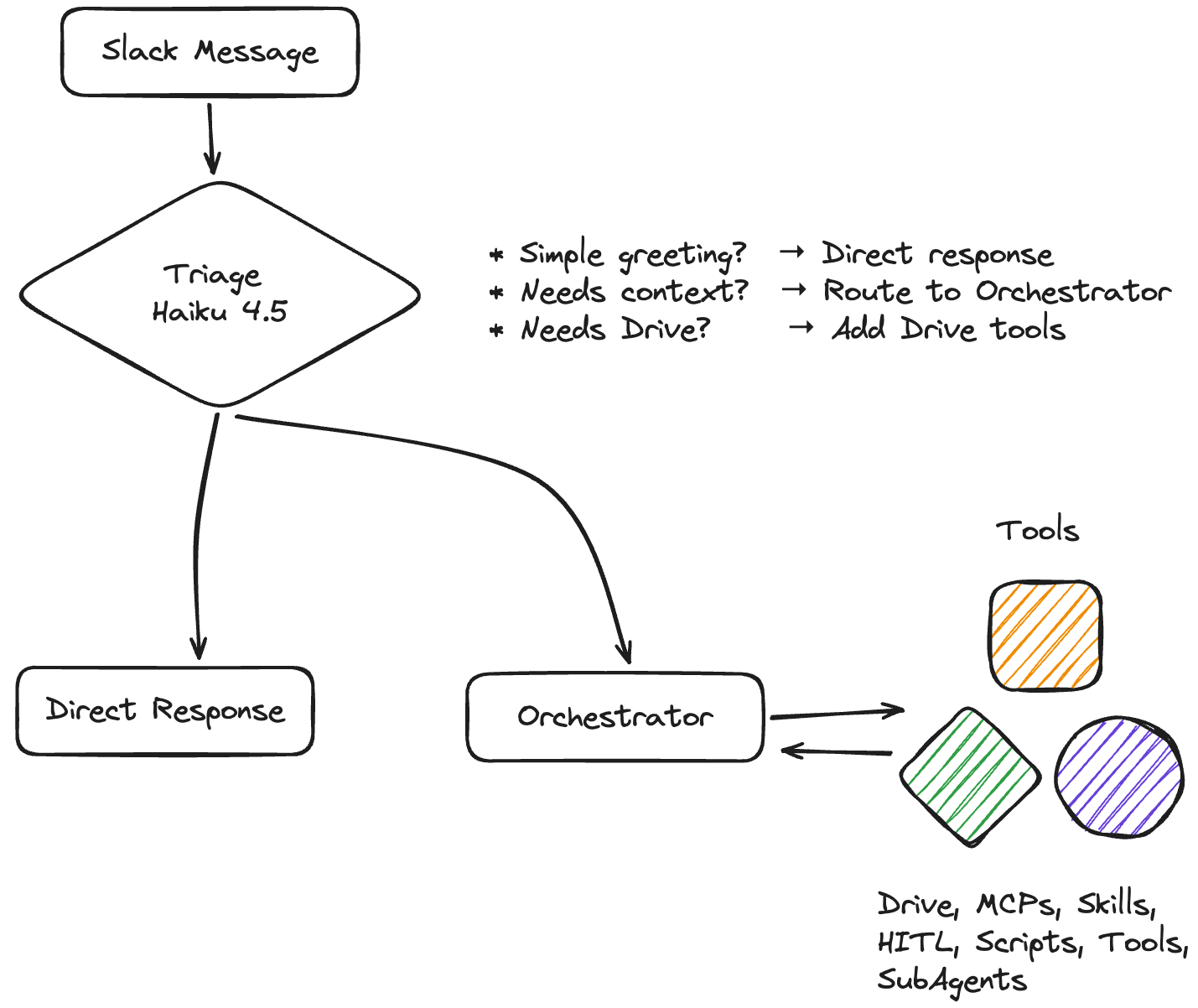
To the Orchestrator, everything is a tool. This includes Drive, but also Users are tools. We can’t make a one size fits all tool though. For systems that contain confidential information, we have to create per-user OAuth.
When Alice asks about her Drive files, the bot uses Alice’s tokens. Bob’s request uses Bob’s tokens. No shared service account with god-mode access to everything. No MCP server you don’t control sitting between your users and their data.
Getting Started
Clone Vercel’s Slack Bolt template:
git clone https://github.com/vercel-partner-solutions/slack-bolt-with-next.git my-slack-bot
cd my-slack-bot
pnpm install

# Add the AI bits
pnpm add ai @ai-sdk/anthropic zod googleapis @vercel/kv
This stack:
Next.js on Vercel (serverless, scales to zero)
Slack Bolt for event handling
Vercel AI SDK 5 for Claude integration
Vercel KV (Redis) for token storage
Google APIs for Drive access
Vercel has already done a lot of the heavy lifting for interfacing with the Slack Bolt api. That leaves us to concentrate on the Agent experience and tools.
The Agent Core
Fast triage decides what the request actually needs:
const triageSchema = z.object({
  isSimple: z.boolean(),
  directResponse: z.string().optional(),
  needsTools: z.boolean(),
  needsDrive: z.boolean(),
  thinkingMessage: z.string().optional(),
});

async function triageRequest(message: string, hasDriveConnected: boolean) {
  const result = await generateObject({
    model: anthropic(”claude-haiku-4-5”),
    schema: triageSchema,
    system: `Triage system. Decide if this needs tools or Drive access.
${hasDriveConnected ? “User HAS Drive connected.” : “User has NOT connected Drive.”}`,
    prompt: message,
  });
  return result.object;
}
Simple questions get instant responses from Haiku 4.5 (~$1/M tokens). Complex requests get Sonnet with tools (~$3/M tokens). If 70% of messages are simple, you’re saving 10x on the majority of traffic.
From a per-request perspective, this sounds expensive to just surface files from Drive. From a business perspective, I think it makes sense though. This sits squarely on the opportunity cost side of the equation giving people answers faster with more accurate information.
Losing a deal or 20 hours of developer time costs much more than 200 unneeded AI calls.
The Drive Integration
Per-user OAuth is more work than a service account but infinitely more secure.
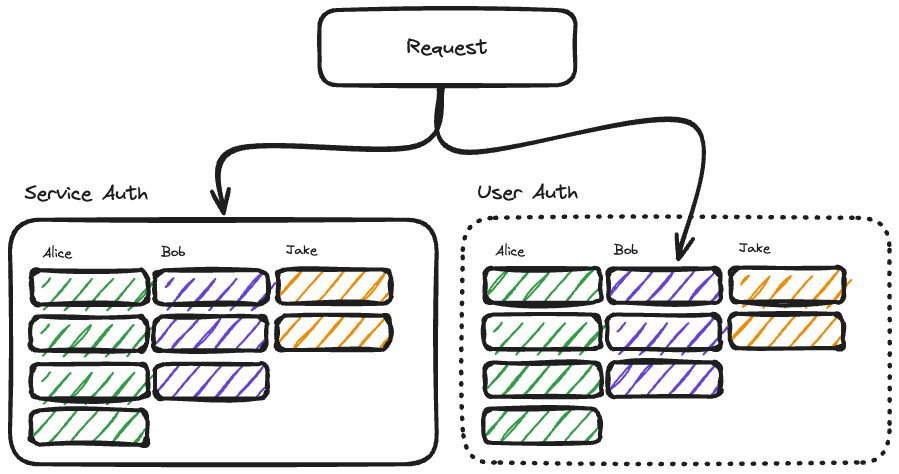
In either model, Bob can request anybody’s files if he has the link. I don’t expect our agent to enforce this, we want this managed on the tool/engineering side. For service auth, we take on the burden of ensuring Bob only requests access to the files that Bob has access to.
In user auth, we let Google Drive take on the burden of ensuring access. This is much safer.
Token Storage
import { kv } from “@vercel/kv”;

export interface GoogleTokens {
  accessToken: string;
  refreshToken: string;
  expiresAt: number;
  email: string;
}

export async function getTokens(userId: string): Promise<GoogleTokens | null> {
  return await kv.get<GoogleTokens>(`google:${userId}`);
}

export async function setTokens(userId: string, tokens: GoogleTokens): Promise<void> {
  await kv.set(`google:${userId}`, tokens);
}
Key format: google:{slackUserId}. Each Slack user gets their own credentials. If you want to conform this with your org’s session policy, you can control your TTL policy. It’s also primed for expansion to other services.
OAuth Flow
// Initiate: /api/auth/google?user=U12345
export async function GET(request: NextRequest) {
  const userId = request.nextUrl.searchParams.get(”user”);
  const state = createSignedState(userId); // CSRF protection

  const authUrl = oauth2Client.generateAuthUrl({
    access_type: “offline”,
    prompt: “consent”,
    scope: [
      “https://www.googleapis.com/auth/drive.readonly”,
      “https://www.googleapis.com/auth/userinfo.email”,
    ],
    state,
  });
  return NextResponse.redirect(authUrl);
}
Callback exchanges code for tokens, verifies state, stores credentials.
Drive Tools
export function createDriveTools(userId: string) {
  return {
    searchDrive: tool({
      description: “Search the user’s Google Drive”,
      inputSchema: z.object({
        query: z.string(),
        maxResults: z.number().default(10),
      }),
      execute: async ({ query, maxResults }) => {
        const tokens = await getValidTokens(userId);
        if (!tokens) {
          return { error: “Drive not connected. Visit App Home to connect.” };
        }

        const drive = google.drive({ version: “v3”, auth: makeClient(tokens) });
        const res = await drive.files.list({
          q: `fullText contains ‘${query}’ and trashed = false`,
          pageSize: maxResults,
          fields: “files(id, name, mimeType, modifiedTime, webViewLink)”,
        });

        return res.data.files.map(f => ({
          name: f.name,
          link: f.webViewLink,
          modified: f.modifiedTime,
        }));
      },
    }),
  };
}
getValidTokens checks expiration and auto-refreshes. Users never see token errors.
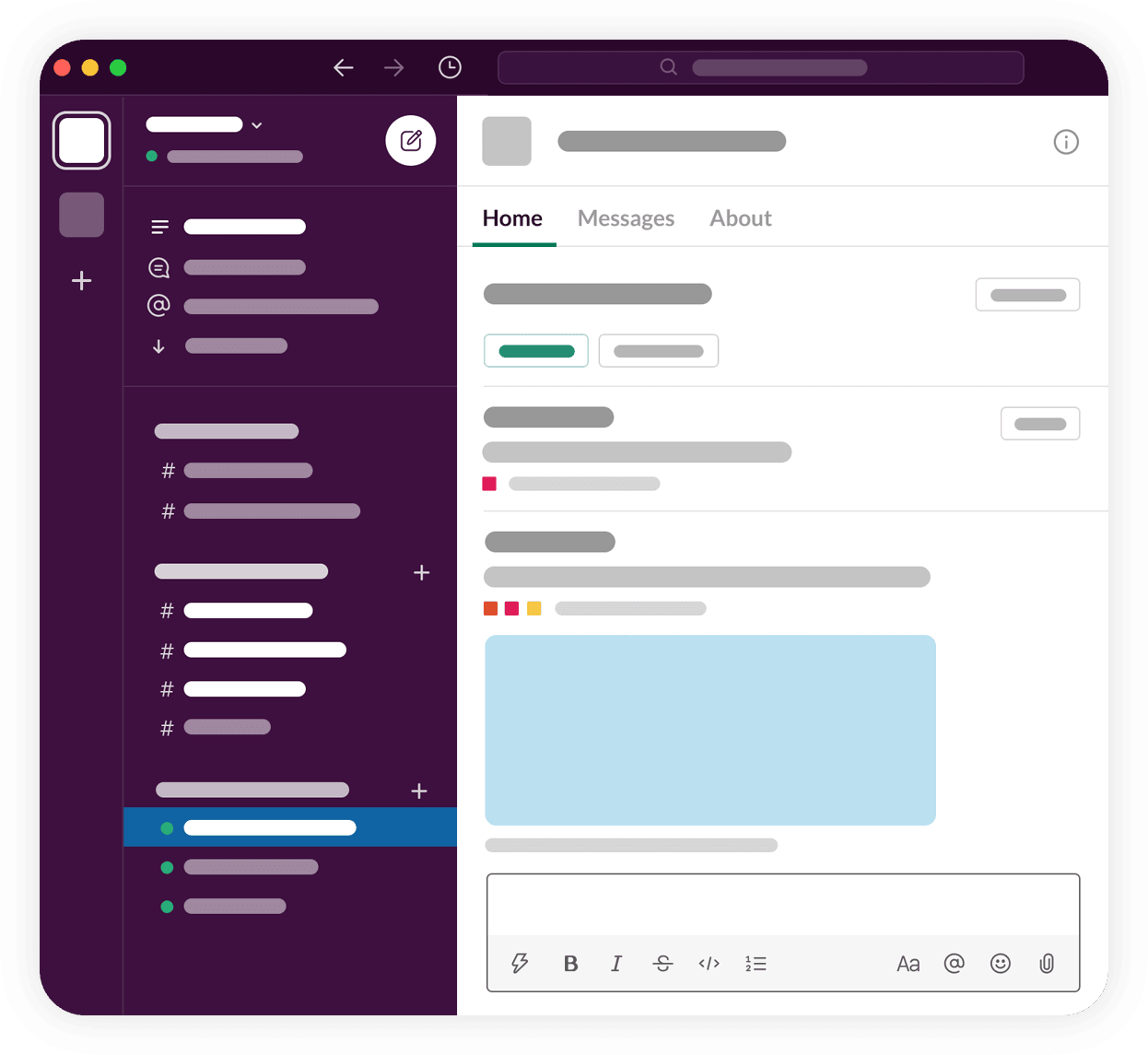
App Home Connection UI
Users connect via Slack’s App Home tab:
export async function buildHomeView(userId: string) {
  const tokens = await getTokens(userId);
  const isConnected = tokens !== null;

  if (isConnected) {
    // Show “Connected as email” + Disconnect button
  } else {
    // Show Connect button with OAuth URL
  }
}
Click button → browser opens → Google consent → tokens stored → done.
Wiring It Together
The agent conditionally includes Drive tools:
export async function runAgent(message: string, client: WebClient, ctx: AgentContext) {
  const hasDriveConnected = await hasTokens(ctx.userId);

  const slackTools = createSlackTools(client);
  const driveTools = hasDriveConnected ? createDriveTools(ctx.userId) : {};

  const result = await generateText({
    model: anthropic(”claude-sonnet-4-5”),
    system: `You are Anton. When showing Drive files, include clickable links.`,
    tools: { ...slackTools, ...driveTools },
    prompt: message,
  });

  return result.text;
}
No Drive connection = no Drive tools. The agent can’t hallucinate access it doesn’t have.
Gotchas
Google OAuth Verification: drive.readonly requires app verification for production. Add yourself as a test user in Google Cloud Console to bypass during development (up to 100 test users).
Slack Markdown: It’s *bold* not **bold**, links are <url|text> not [text](url). Tell your agent explicitly.
Token Refresh: Access tokens expire hourly. Always check and refresh proactively.
What This Enables
“What’s in my recent files?” → Lists docs with links
“Find the Q3 planning doc” → Searches Drive
“Summarize the budget spreadsheet” → Reads and summarizes
“What did we decide about the launch?” → Searches Slack + Drive
A unified interface to your work context. Your files, your permissions, your control.
No MCP middleman required.
I started this because I didn’t trust an MCP server I didn’t control with enterprise data. I ended up with something better: a pattern that works for any third-party integration where per-user auth matters.
The MCP ecosystem will mature. Official Google Drive servers will probably exist by the time you read this. But user-scoped OAuth, conditional tool injection, token lifecycle management; that’s the template for integrating anything sensitive into an agentic system.
You can’t outsource trust. The code path from “user asks question” to “API call with their credentials” needs to be code you understand and control.
Eighteen files. A few hours with Claude Code. And now I have a Slack bot that actually knows my stuff, with an auth model I can explain to the security team.
Build the thing. Own the plumbing.